overhear

Free and open source, MIT

overhear: hear what your LAN announces.

A passive listener for your local network. It decodes what every device tells everybody, keeps a table of who is there, and warns when something looks wrong.

  • Linux
  • amd64 and arm64
  • Never transmits
  • MIT licence

One small binary, as a line per packet, a verbose dump, JSON lines or a live screen. Version 0.1.1 adds --proto, to hear only the protocols you name. It is still an early release: see Good to know.

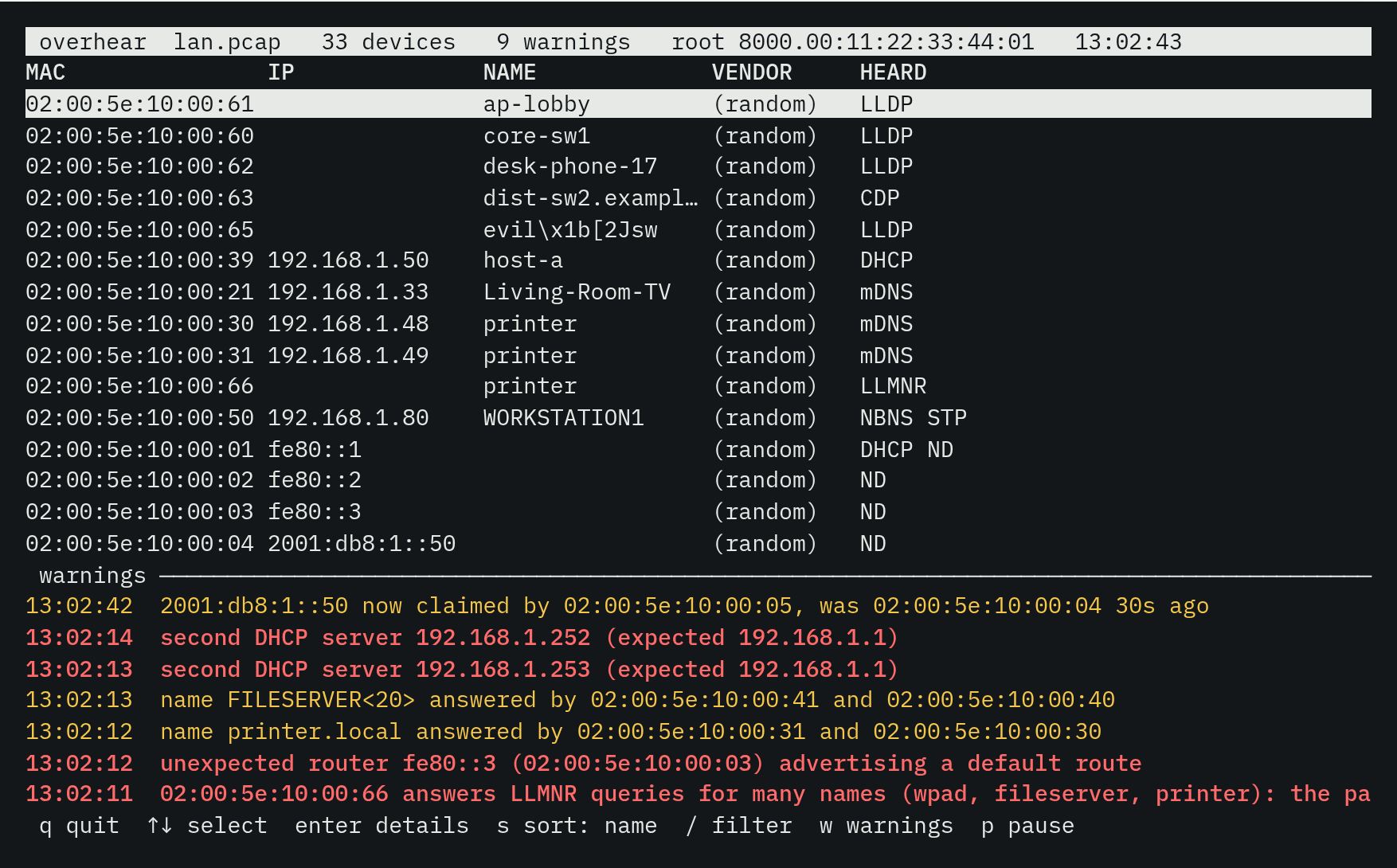
The overhear live screen: a table of 33 devices sorted by name, among them a core switch, an access point, a desk phone, a TV and two printers, above a warnings pane listing two rogue DHCP servers, an unexpected IPv6 router, an address conflict and a name-poisoning pattern

01 / Why overhear

Who is there, and what they say.

Every network chatters. Devices ask for addresses, announce their names and services, and advertise routes to anyone listening. overhear listens, and turns that chatter into a list of devices and a short list of things to worry about.

Who is there

Every device it hears goes into a table: its MAC and IP addresses, the names it gives itself over DHCP, mDNS, NetBIOS, LLMNR, LLDP and CDP, its vendor, and the protocols it spoke.

What looks wrong

A second DHCP server, an IPv6 router that should not be there, two devices claiming one address, and the answer-everything pattern of poisoning tools such as Responder.

It never sends a packet

No replies, no scans, no name lookups. You can leave it on a mirror port of a network you do not own and it stays silent.

Hard to hurt

Text from packets is escaped before it reaches your terminal. Privileges are dropped as soon as the capture is open, and memory is capped at a budget you can set.

02 / Feature tour

Four ways to listen.

Every sample below is real output of overhear 0.1.1, run over the generated test captures that ship with the source.

01 / default

One line per packet

Each line has the time, the protocol, the source and a summary. Warnings (WARN) and newly learned baselines (NOTE) get lines of their own, right after the packet that caused them.

Here a second DHCP server answers a client, a server on VLAN 100 is learned separately, and a damaged offer is still decoded as far as it goes.

$ overhear -r dhcp.pcap
2026-11-21 13:02:11.000 DHCP  02:00:5e:10:00:39  DISCOVER from 02:00:5e:10:00:39 "host-a"
2026-11-21 13:02:11.250 DHCP  192.168.1.1        OFFER 192.168.1.50 to 02:00:5e:10:00:39
2026-11-21 13:02:11.250 NOTE  expected DHCP server 192.168.1.1 (learned)
2026-11-21 13:02:11.500 DHCP  192.168.1.254      OFFER 192.168.1.51 to 02:00:5e:10:00:39
2026-11-21 13:02:11.500 WARN  second DHCP server 192.168.1.254 (expected 192.168.1.1)
2026-11-21 13:02:11.750 DHCP  02:00:5e:10:00:39  REQUEST 192.168.1.50 by 02:00:5e:10:00:39 "host-a"
2026-11-21 13:02:12.000 DHCP  192.168.1.1        ACK 192.168.1.50 to 02:00:5e:10:00:39
2026-11-21 13:02:12.250 DHCP  192.168.1.1        NAK to 02:00:5e:10:00:39
2026-11-21 13:02:12.500 DHCP  10.9.9.1           [100] OFFER 10.9.9.50 to 02:00:5e:10:00:3a
2026-11-21 13:02:12.500 NOTE  [100] expected DHCP server 10.9.9.9 (learned)
2026-11-21 13:02:12.750 DHCP  192.168.1.1        OFFER 192.168.1.52 to 02:00:5e:10:00:39
2026-11-21 13:02:13.000 DHCP  192.168.1.1        OFFER 192.168.1.53 to 02:00:5e:10:00:39 [malformed: dhcp truncated]
2026-11-21 13:02:13.250 DHCP  192.168.1.1        ACK 192.168.1.54 to 02:00:5e:10:00:39
2026-11-21 13:02:13.500 DHCP  192.168.1.1        ACK 192.168.1.55 to 02:00:5e:10:00:39
2026-11-21 13:02:13.750 DHCP  192.168.1.253      OFFER 192.168.1.56 to 02:00:5e:10:00:39
2026-11-21 13:02:13.750 WARN  second DHCP server 192.168.1.253 (expected 192.168.1.1)
2026-11-21 13:02:14.000 DHCP  192.168.1.252      [0] OFFER 192.168.1.57 to 02:00:5e:10:00:39
2026-11-21 13:02:14.000 WARN  second DHCP server 192.168.1.252 (expected 192.168.1.1)
overhear: 13 packets, 0 dropped by the kernel, 0 dropped by overhear, 6 devices
02 / -v

Every field

A block per packet: one line per layer and, for protocols with options or TLVs, one line each.

Here two filter words pick out a switch's LLDP announcement and a Cisco CDP one: names, ports, capabilities, management addresses, software and native VLAN.

$ overhear -v -r lldp_cdp.pcap \
  ether src 02:00:5e:10:00:60 or ether src 02:00:5e:10:00:63
2026-11-21 13:02:11.000  122 bytes
  ETH   02:00:5e:10:00:60 → 01:80:c2:00:00:0e  type 0x88cc
  LLDP  chassis 02:00:5e:10:00:60 subtype 4
        port Gi1/0/24 subtype 5
        ttl 120
        port-descr uplink to distribution
        sysname core-sw1
        sysdescr Acme Switch OS 4.2
        capabilities bridge router enabled bridge router
        mgmt 192.168.1.2 subtype 1
        port-vlan 10

2026-11-21 13:02:11.750  184 bytes
  ETH   02:00:5e:10:00:63 → 01:00:0c:cc:cc:cc  snap oui 00000c pid 0x2000
  CDP   version 2 ttl 180
        device-id dist-sw2.example.net
        addresses 192.168.1.3
        port-id GigabitEthernet1/0/1
        capabilities 0x00000028 switch igmp
        software Cisco IOS Software, Version 15.2(7)E
        platform cisco WS-C2960X-48TS-L
        vtp-domain corp
        native-vlan 10
        duplex full

overhear: 2 packets, 0 dropped by the kernel, 0 dropped by overhear, 2 devices
03 / -j

JSON lines

One object per line, each starting with "schema":1 and a type: packet, warning, baseline or status. Here the first line of a capture, pretty-printed by jq.

Text that is not valid UTF-8 goes into a _hex field instead, so nothing from the wire can break the JSON.

$ overhear -j -r arp.pcap | head -n 1 | jq .
{
  "schema": 1,
  "type": "packet",
  "ts": 1795266131.000000,
  "time": "2026-11-21T13:02:11.000+00:00",
  "len": 60,
  "src": {
    "mac": "02:00:5e:10:00:01"
  },
  "dst": {
    "mac": "ff:ff:ff:ff:ff:ff"
  },
  "proto": "arp",
  "arp": {
    "op": 1,
    "kind": "request",
    "sender_mac": "02:00:5e:10:00:01",
    "sender_ip": "192.168.1.20",
    "target_mac": "00:00:00:00:00:00",
    "target_ip": "192.168.1.1"
  }
}
04 / -t

The live screen

A table of devices with their addresses, names, vendor and the protocols heard, and a pane of warnings below: high in red, low in yellow.

q quits, Enter opens a device with everything known about it, s changes the sort, / filters, w moves to the warnings and p pauses the table.

 overhear  lan.pcap   33 devices   9 warnings   root 8000.00:11:22:33:44:01   13:02:43              
MAC               IP              NAME             VENDOR     HEARD
02:00:5e:10:00:61                 ap-lobby         (random)   LLDP                                  
02:00:5e:10:00:60                 core-sw1         (random)   LLDP
02:00:5e:10:00:62                 desk-phone-17    (random)   LLDP
02:00:5e:10:00:63                 dist-sw2.exampl… (random)   CDP
02:00:5e:10:00:65                 evil\x1b[2Jsw    (random)   LLDP
02:00:5e:10:00:39 192.168.1.50    host-a           (random)   DHCP
02:00:5e:10:00:21 192.168.1.33    Living-Room-TV   (random)   mDNS
02:00:5e:10:00:30 192.168.1.48    printer          (random)   mDNS
02:00:5e:10:00:31 192.168.1.49    printer          (random)   mDNS
02:00:5e:10:00:66                 printer          (random)   LLMNR
02:00:5e:10:00:50 192.168.1.80    WORKSTATION1     (random)   NBNS STP
02:00:5e:10:00:01 fe80::1                          (random)   DHCP ND
02:00:5e:10:00:02 fe80::2                          (random)   ND
02:00:5e:10:00:03 fe80::3                          (random)   ND
02:00:5e:10:00:04 2001:db8:1::50                   (random)   ND
 warnings ──────────────────────────────────────────────────────────────────────────────────────────
13:02:42  2001:db8:1::50 now claimed by 02:00:5e:10:00:05, was 02:00:5e:10:00:04 30s ago
13:02:14  second DHCP server 192.168.1.252 (expected 192.168.1.1)
13:02:13  second DHCP server 192.168.1.253 (expected 192.168.1.1)
13:02:13  name FILESERVER<20> answered by 02:00:5e:10:00:41 and 02:00:5e:10:00:40
13:02:12  name printer.local answered by 02:00:5e:10:00:31 and 02:00:5e:10:00:30
13:02:12  unexpected router fe80::3 (02:00:5e:10:00:03) advertising a default route
13:02:11  02:00:5e:10:00:66 answers LLMNR queries for many names (wpad, fileserver, printer): the pa
 q quit  ↑↓ select  enter details  s sort: name  / filter  w warnings  p pause
Drawn by overhear's own screen code over six of the test captures, read together in time order and sorted by name. The test captures use locally administered MAC addresses, so the vendor column says (random). The name on the fifth row arrived with a terminal escape sequence in it, and is shown escaped.

03 / What it decodes

Ten protocols, spoken out loud.

By default overhear asks the kernel for just what it can decode: broadcast and multicast frames, ARP, the DHCP, NetBIOS, SSDP, mDNS and LLMNR ports, and IPv6 neighbour discovery.

ARP

Who has which IPv4 address: requests, replies, probes and announcements.

DHCP

Clients and the host names they send, and every server that offers, acknowledges or refuses an address, with each option decoded.

IPv6 neighbour discovery

Routers with their prefixes, DNS servers and routes; neighbour advertisements and duplicate address checks.

mDNS

The names, addresses and services devices advertise: printers, TVs, phones, AirPlay and Cast targets.

LLMNR

Windows name queries, and who answers them.

NetBIOS name service

Workstation and workgroup names as they register, and who answers queries for them.

SSDP

UPnP devices announcing themselves and answering searches, with their device type and description URL.

LLDP

Switch, access point and phone names, ports, capabilities, management addresses and VLANs.

CDP

Cisco device names, ports, platform, software version, VTP domain and native VLAN.

STP, RSTP and MSTP

The root bridge, each bridge's id and path cost, and topology changes.

Frames may carry up to four 802.1Q or QinQ VLAN tags, and each VLAN is learned on its own. Anything else that gets through the filter is shown in brief: UDP ports, the ICMPv6 type, LLC or the ethertype. A damaged packet is decoded as far as it goes, with a note saying where it broke.

04 / Warnings

Four warnings worth reading.

overhear learns what is normal on each VLAN and warns when something differs. High means very likely a problem; low means odd and worth a look. A warning is shown the first time it happens; repeats are counted and summarised at most once a minute.

second-dhcp-server

high

A DHCP offer, ACK or NAK from a server other than the expected one. The first server a VLAN hears is learned, unless you pinned one.

unexpected-router

high low

An IPv6 router advertising a default route that is not the expected router (high), or a router with no default route that hands out DNS servers or a global prefix (low).

address-conflict

low high

An IPv4 or IPv6 address claimed by a different MAC than before, seen in ARP or neighbour advertisements. High when the address belongs to an expected DHCP server, its gateway or an expected router.

suspicious-name-answers

low high

One name answered differently by two devices within five minutes (low), or one device answering LLMNR or NetBIOS queries for three different names (high): the pattern of poisoning tools such as Responder.

Two more keep the picture honest: capture-drops says at once when frames were dropped, so a quiet screen is not mistaken for a quiet network, and memory-eviction says when the memory budget forced old devices out, as a flood of fake MAC addresses would.

$ for f in dhcp nd arp llmnr_nbns mdns; do overhear -r $f.pcap; done 2>/dev/null | grep WARN
2026-11-21 13:02:11.500 WARN  second DHCP server 192.168.1.254 (expected 192.168.1.1)
2026-11-21 13:02:13.750 WARN  second DHCP server 192.168.1.253 (expected 192.168.1.1)
2026-11-21 13:02:14.000 WARN  second DHCP server 192.168.1.252 (expected 192.168.1.1)
2026-11-21 13:02:11.750 WARN  router advert from fe80::2 (02:00:5e:10:00:02) carries DNS servers
2026-11-21 13:02:12.000 WARN  unexpected router fe80::3 (02:00:5e:10:00:03) advertising a default route
2026-11-21 13:02:42.750 WARN  2001:db8:1::50 now claimed by 02:00:5e:10:00:05, was 02:00:5e:10:00:04 30s ago
2026-11-21 13:03:12.250 WARN  192.168.1.50 now claimed by 02:00:5e:10:00:0b, was 02:00:5e:10:00:0a 1m ago
2026-11-21 13:02:11.750 WARN  02:00:5e:10:00:66 answers LLMNR queries for many names (wpad, fileserver, printer): the pattern of poisoning tools such as Responder
2026-11-21 13:02:13.000 WARN  name FILESERVER<20> answered by 02:00:5e:10:00:41 and 02:00:5e:10:00:40
2026-11-21 13:02:12.000 WARN  name printer.local answered by 02:00:5e:10:00:31 and 02:00:5e:10:00:30

Pin what you expect

The first DHCP server and IPv6 router each VLAN hears are trusted and announced with a NOTE line. To avoid trusting whoever speaks first, name them with --dhcp-server IP[@VLAN] and --router MAC|IPV6[@VLAN], as often as you need.

A pin without @VLAN applies to every VLAN; QinQ is written outer first, as @200.100. A VLAN covered by a pin learns nothing by itself, so pinning 192.168.1.1 for every VLAN also flags the server on VLAN 100, until that one is pinned for VLAN 100 too.

$ overhear -r dhcp.pcap --dhcp-server 192.168.1.1 2>/dev/null | grep WARN
2026-11-21 13:02:11.500 WARN  second DHCP server 192.168.1.254 (expected 192.168.1.1)
2026-11-21 13:02:12.500 WARN  [100] second DHCP server 10.9.9.9 (expected 192.168.1.1)
2026-11-21 13:02:13.750 WARN  second DHCP server 192.168.1.253 (expected 192.168.1.1)
2026-11-21 13:02:14.000 WARN  second DHCP server 192.168.1.252 (expected 192.168.1.1)
$ overhear -r dhcp.pcap --dhcp-server 192.168.1.1 --dhcp-server 10.9.9.9@100 2>/dev/null | grep WARN
2026-11-21 13:02:11.500 WARN  second DHCP server 192.168.1.254 (expected 192.168.1.1)
2026-11-21 13:02:13.750 WARN  second DHCP server 192.168.1.253 (expected 192.168.1.1)
2026-11-21 13:02:14.000 WARN  second DHCP server 192.168.1.252 (expected 192.168.1.1)

05 / Usage

One binary, a handful of flags.

Point it at an interface, or at a recording made with tcpdump or Wireshark. Reading a file needs no privileges at all.

Extra words at the end are a capture filter in pcap-filter syntax, joined to the built-in filter with and: they can only narrow what is shown. Write addresses and ports as numbers, because names in a filter are looked up by libpcap. Options go before the filter words.

To hear only some protocols, name them with --proto; the recipes below show it at work.

Every option, rule and JSON field is in the manual, also installed as man overhear.

# one line per packet (as root, it then runs as nobody)
$ sudo overhear -i eth0

# read a recording, or a live pipe from tcpdump
$ overhear -r capture.pcap
$ tcpdump -i eth0 -w - -s 0 | overhear -r -

# only what concerns one host
$ overhear -i eth0 host 192.168.1.20

# only DHCP and mDNS
$ overhear -i eth0 --proto dhcp,mdns

# JSON lines, warnings only
$ overhear -j -i eth0 | jq -c 'select(.type == "warning")'

# the live screen
$ overhear -t -i eth0

# the interfaces you can capture from
$ overhear -D

The flags

FlagWhat it does
-i IFACECapture from this interface. Without -i or -r, the system's default capture device.
-r FILERead a pcap or pcapng file instead; -r - reads standard input. Times then include the date.
-tThe live screen.
-vEvery decoded field, a block per packet.
-jOne JSON object per line. -j, -t and -v cannot be combined.
-HAdd a hex dump of each frame, or a frame_hex member in JSON.
-pDo not put the interface in promiscuous mode.
-Z USERWhen started as root, the user to switch to once the capture is open (default nobody).
--proto NAMESOnly these protocols, separated by commas: arp, dhcp, nd, mdns, llmnr, nbns, ssdp, lldp, cdp, stp. Repeatable, and joined to filter words with and.
--dhcp-server IP[@VLAN]A DHCP server you expect. Repeat it for a failover pair or one server per VLAN.
--router MAC|IPV6[@VLAN]An IPv6 router you expect, by MAC or link-local address. Repeatable.
--max-memory SIZEThe budget for what overhear remembers, with a K, M or G suffix. Default 64M, at least 4M.
-DList the interfaces you can capture from, and exit.
FILTER…Capture filter words, joined to the built-in filter with and.
-h, -VHelp and version.

JSON for your scripts

Every line of -j output is one JSON object with "schema":1 and a type. A complete run ends with a status line marked "final":true; if it is missing, the run stopped early.

The three one-liners here run on the DHCP test capture: everything but the packets, the rogue server and its MAC, and devices per vendor prefix. The first three bytes of a MAC (the OUI) name its maker; the test captures use locally administered addresses, so they share one prefix.

$ overhear -j -r dhcp.pcap | jq -c 'select(.type != "packet")'
{"schema":1,"type":"baseline","ts":1795266131.250000,"time":"2026-11-21T13:02:11.250+00:00","segment":"untagged","what":"dhcp-server","ip":"192.168.1.1"}
{"schema":1,"type":"warning","ts":1795266131.500000,"time":"2026-11-21T13:02:11.500+00:00","rule":"second-dhcp-server","severity":"high","segment":"untagged","subject":"192.168.1.254","message":"second DHCP server 192.168.1.254 (expected 192.168.1.1)","macs":["02:00:5e:10:00:fe","02:00:5e:10:00:39"],"addrs":["192.168.1.254"],"count":1}
{"schema":1,"type":"baseline","ts":1795266132.500000,"time":"2026-11-21T13:02:12.500+00:00","segment":"100","what":"dhcp-server","ip":"10.9.9.9"}
{"schema":1,"type":"warning","ts":1795266133.750000,"time":"2026-11-21T13:02:13.750+00:00","rule":"second-dhcp-server","severity":"high","segment":"untagged","subject":"192.168.1.253","message":"second DHCP server 192.168.1.253 (expected 192.168.1.1)","macs":["02:00:5e:10:00:fd","02:00:5e:10:00:39"],"addrs":["192.168.1.253"],"count":1}
{"schema":1,"type":"warning","ts":1795266134.000000,"time":"2026-11-21T13:02:14.000+00:00","rule":"second-dhcp-server","severity":"high","segment":"untagged","subject":"192.168.1.252","message":"second DHCP server 192.168.1.252 (expected 192.168.1.1)","macs":["02:00:5e:10:00:fc","02:00:5e:10:00:39"],"addrs":["192.168.1.252"],"count":1}
{"schema":1,"type":"status","final":true,"packets":13,"kernel_drops":0,"channel_drops":0,"devices":6,"evictions":0}
$ overhear -j -r dhcp.pcap | jq -r 'select(.rule == "second-dhcp-server") | "\(.subject) \(.macs[0])"'
192.168.1.254 02:00:5e:10:00:fe
192.168.1.253 02:00:5e:10:00:fd
192.168.1.252 02:00:5e:10:00:fc
$ overhear -j -r dhcp.pcap | jq -rs 'map(select(.type == "packet") | .src.mac // empty) | unique | group_by(.[:8])[] | "\(length) \(.[0][:8])"'
6 02:00:5e

06 / Recipes

Ask a narrower question.

Each recipe gives the command for a live interface, then the same options over lan.pcap: six of the test captures (DHCP, IPv6 neighbour discovery, mDNS, LLMNR and NetBIOS, LLDP and CDP, spanning tree) merged in time order, the same capture the live screen above shows. The output is real.

01 / two protocols

Only DHCP and mDNS

Name the protocols you care about, separated by commas. Everything else is filtered out before overhear decodes it, so the lines, the warnings and the device count cover only those protocols.

Here the neighbour discovery, LLMNR, NetBIOS, LLDP, CDP and spanning tree frames in the capture are gone. --proto works the same with -v, -j and -t.

# on the LAN
$ sudo overhear -i eth0 --proto dhcp,mdns

# the same over the test capture
$ overhear -r lan.pcap --proto dhcp,mdns
2026-11-21 13:02:11.000 DHCP  02:00:5e:10:00:39  DISCOVER from 02:00:5e:10:00:39 "host-a"
2026-11-21 13:02:11.000 mDNS  192.168.1.32       query _googlecast._tcp.local PTR
2026-11-21 13:02:11.250 DHCP  192.168.1.1        OFFER 192.168.1.50 to 02:00:5e:10:00:39
2026-11-21 13:02:11.250 NOTE  expected DHCP server 192.168.1.1 (learned)
2026-11-21 13:02:11.250 mDNS  192.168.1.33       Living-Room-TV._googlecast._tcp.local (+3 records)
2026-11-21 13:02:11.500 DHCP  192.168.1.254      OFFER 192.168.1.51 to 02:00:5e:10:00:39
2026-11-21 13:02:11.500 WARN  second DHCP server 192.168.1.254 (expected 192.168.1.1)
2026-11-21 13:02:11.500 mDNS  192.168.1.33       goodbye Living-Room-TV._googlecast._tcp.local
2026-11-21 13:02:11.750 DHCP  02:00:5e:10:00:39  REQUEST 192.168.1.50 by 02:00:5e:10:00:39 "host-a"
2026-11-21 13:02:11.750 mDNS  192.168.1.48       printer.local → 192.168.1.48
2026-11-21 13:02:12.000 DHCP  192.168.1.1        ACK 192.168.1.50 to 02:00:5e:10:00:39
2026-11-21 13:02:12.000 mDNS  192.168.1.49       printer.local → 192.168.1.49
2026-11-21 13:02:12.000 WARN  name printer.local answered by 02:00:5e:10:00:31 and 02:00:5e:10:00:30
2026-11-21 13:02:12.250 DHCP  192.168.1.1        NAK to 02:00:5e:10:00:39
2026-11-21 13:02:12.250 mDNS  192.168.1.34       query <bad name> PTR [malformed: dns compression pointer does not point backwards]
2026-11-21 13:02:12.500 DHCP  10.9.9.1           [100] OFFER 10.9.9.50 to 02:00:5e:10:00:3a
2026-11-21 13:02:12.500 NOTE  [100] expected DHCP server 10.9.9.9 (learned)
2026-11-21 13:02:12.500 mDNS  192.168.1.64       Evil\x1b[2J\u{202e}Name._airplay._tcp.local
2026-11-21 13:02:12.750 DHCP  192.168.1.1        OFFER 192.168.1.52 to 02:00:5e:10:00:39
2026-11-21 13:02:12.750 mDNS  192.168.1.65       Bjørn's iPhone._companion-link._tcp.local
2026-11-21 13:02:13.000 DHCP  192.168.1.1        OFFER 192.168.1.53 to 02:00:5e:10:00:39 [malformed: dhcp truncated]
2026-11-21 13:02:13.250 DHCP  192.168.1.1        ACK 192.168.1.54 to 02:00:5e:10:00:39
2026-11-21 13:02:13.500 DHCP  192.168.1.1        ACK 192.168.1.55 to 02:00:5e:10:00:39
2026-11-21 13:02:13.750 DHCP  192.168.1.253      OFFER 192.168.1.56 to 02:00:5e:10:00:39
2026-11-21 13:02:13.750 WARN  second DHCP server 192.168.1.253 (expected 192.168.1.1)
2026-11-21 13:02:14.000 DHCP  192.168.1.252      [0] OFFER 192.168.1.57 to 02:00:5e:10:00:39
2026-11-21 13:02:14.000 WARN  second DHCP server 192.168.1.252 (expected 192.168.1.1)
overhear: 21 packets, 0 dropped by the kernel, 0 dropped by overhear, 13 devices
02 / rogue DHCP

Watch for rogue DHCP servers

Pin the DHCP server you run and listen to DHCP alone. With a pin nothing is learned, so there is no NOTE line, and every other server that offers, acknowledges or refuses an address gets a WARN, on any VLAN.

Here three rogue servers answer on the untagged network, and the server on VLAN 100 is flagged too, until a second pin, --dhcp-server 10.9.9.9@100, names it.

# on the LAN
$ sudo overhear -i eth0 --proto dhcp --dhcp-server 192.168.1.1

# the same over the test capture
$ overhear -r lan.pcap --proto dhcp --dhcp-server 192.168.1.1
2026-11-21 13:02:11.000 DHCP  02:00:5e:10:00:39  DISCOVER from 02:00:5e:10:00:39 "host-a"
2026-11-21 13:02:11.250 DHCP  192.168.1.1        OFFER 192.168.1.50 to 02:00:5e:10:00:39
2026-11-21 13:02:11.500 DHCP  192.168.1.254      OFFER 192.168.1.51 to 02:00:5e:10:00:39
2026-11-21 13:02:11.500 WARN  second DHCP server 192.168.1.254 (expected 192.168.1.1)
2026-11-21 13:02:11.750 DHCP  02:00:5e:10:00:39  REQUEST 192.168.1.50 by 02:00:5e:10:00:39 "host-a"
2026-11-21 13:02:12.000 DHCP  192.168.1.1        ACK 192.168.1.50 to 02:00:5e:10:00:39
2026-11-21 13:02:12.250 DHCP  192.168.1.1        NAK to 02:00:5e:10:00:39
2026-11-21 13:02:12.500 DHCP  10.9.9.1           [100] OFFER 10.9.9.50 to 02:00:5e:10:00:3a
2026-11-21 13:02:12.500 WARN  [100] second DHCP server 10.9.9.9 (expected 192.168.1.1)
2026-11-21 13:02:12.750 DHCP  192.168.1.1        OFFER 192.168.1.52 to 02:00:5e:10:00:39
2026-11-21 13:02:13.000 DHCP  192.168.1.1        OFFER 192.168.1.53 to 02:00:5e:10:00:39 [malformed: dhcp truncated]
2026-11-21 13:02:13.250 DHCP  192.168.1.1        ACK 192.168.1.54 to 02:00:5e:10:00:39
2026-11-21 13:02:13.500 DHCP  192.168.1.1        ACK 192.168.1.55 to 02:00:5e:10:00:39
2026-11-21 13:02:13.750 DHCP  192.168.1.253      OFFER 192.168.1.56 to 02:00:5e:10:00:39
2026-11-21 13:02:13.750 WARN  second DHCP server 192.168.1.253 (expected 192.168.1.1)
2026-11-21 13:02:14.000 DHCP  192.168.1.252      [0] OFFER 192.168.1.57 to 02:00:5e:10:00:39
2026-11-21 13:02:14.000 WARN  second DHCP server 192.168.1.252 (expected 192.168.1.1)
overhear: 13 packets, 0 dropped by the kernel, 0 dropped by overhear, 6 devices
03 / IPv6 routers

IPv6 routers, pinned

nd keeps the five neighbour discovery messages: router solicitations and adverts, neighbour solicitations and adverts, and redirects. Pin the router you expect, by MAC or link-local address.

A router advert with a default route from anyone else is high severity; one without a default route that still hands out DNS servers or a global prefix is low. Two MACs claiming one IPv6 address show up here too.

# on the LAN
$ sudo overhear -i eth0 --proto nd --router fe80::1

# the same over the test capture
$ overhear -r lan.pcap --proto nd --router fe80::1
2026-11-21 13:02:11.000 ND    fe80::9            router solicitation
2026-11-21 13:02:11.250 ND    fe80::1            router advert lifetime 1800s prefix 2001:db8:1::/64 dns 2001:db8::53
2026-11-21 13:02:11.500 ND    fe80::2            router advert lifetime 0 (not a default router) prefix fd00:1::/64
2026-11-21 13:02:11.750 ND    fe80::2            router advert lifetime 0 (not a default router) dns 2001:db8::53
2026-11-21 13:02:11.750 WARN  router advert from fe80::2 (02:00:5e:10:00:02) carries DNS servers
2026-11-21 13:02:12.000 ND    fe80::3            router advert lifetime 600s
2026-11-21 13:02:12.000 WARN  unexpected router fe80::3 (02:00:5e:10:00:03) advertising a default route
2026-11-21 13:02:12.250 ND    02:00:5e:10:00:06  duplicate address check for 2001:db8:1::60
2026-11-21 13:02:12.500 ND    fe80::6            2001:db8:1::60 is-at 02:00:5e:10:00:06 (unsolicited)
2026-11-21 13:02:12.750 ND    fe80::4            2001:db8:1::50 is-at 02:00:5e:10:00:04
2026-11-21 13:02:42.750 ND    fe80::5            2001:db8:1::50 is-at 02:00:5e:10:00:05
2026-11-21 13:02:42.750 WARN  2001:db8:1::50 now claimed by 02:00:5e:10:00:05, was 02:00:5e:10:00:04 30s ago
2026-11-21 13:02:43.000 ND    fe80::7            neighbour solicitation for 2001:db8:1::50 [malformed: nd hop limit not 255 (invalid neighbour discovery)]
2026-11-21 13:02:43.250 ND    fe80::8            router solicitation [malformed: nd zero-length option]
overhear: 11 packets, 0 dropped by the kernel, 0 dropped by overhear, 9 devices
04 / name poisoning

Watch for name poisoning

When DNS has no answer, Windows asks the whole LAN over LLMNR and NetBIOS, and anyone may reply. Poisoning tools such as Responder reply to every such query with their own address, to catch the logins that follow.

One device answering for three different names is a high warning; two devices answering for the same name, a low one.

# on the LAN
$ sudo overhear -i eth0 --proto llmnr,nbns

# the same over the test capture
$ overhear -r lan.pcap --proto llmnr,nbns
2026-11-21 13:02:11.000 LLMNR 192.168.1.32       query wpad A
2026-11-21 13:02:11.250 LLMNR 192.168.1.102      wpad → 192.168.1.102
2026-11-21 13:02:11.500 LLMNR 192.168.1.102      fileserver → 192.168.1.102
2026-11-21 13:02:11.750 LLMNR 192.168.1.102      printer → 192.168.1.102
2026-11-21 13:02:11.750 WARN  02:00:5e:10:00:66 answers LLMNR queries for many names (wpad, fileserver, printer): the pattern of poisoning tools such as Responder
2026-11-21 13:02:12.000 NBNS  192.168.1.80       register WORKSTATION1<00> 192.168.1.80
2026-11-21 13:02:12.250 NBNS  192.168.1.80       register HOME<00> 192.168.1.80
2026-11-21 13:02:12.500 NBNS  192.168.1.32       query FILESERVER<20>
2026-11-21 13:02:12.750 NBNS  192.168.1.64       FILESERVER<20> is 192.168.1.64
2026-11-21 13:02:13.000 NBNS  192.168.1.65       FILESERVER<20> is 192.168.1.65
2026-11-21 13:02:13.000 WARN  name FILESERVER<20> answered by 02:00:5e:10:00:41 and 02:00:5e:10:00:40
2026-11-21 13:02:13.250 NBNS  192.168.1.34       query [malformed: nbns bad NetBIOS name encoding]
2026-11-21 13:02:13.500 NBNS  192.168.1.35       query EVIL\x1b[2JNAME<20>
overhear: 11 packets, 0 dropped by the kernel, 0 dropped by overhear, 7 devices
05 / wiring

Switches and wiring

Switches, access points and phones announce their name, what they are and the port the frame left from, over LLDP or Cisco's CDP. Spanning tree names the root bridge and each bridge's cost to reach it, and reports topology changes.

Plugged into a switch port, this tells you which switch and port you are on, and which bridge is the root of the tree.

# on the LAN
$ sudo overhear -i eth0 --proto lldp,cdp,stp

# the same over the test capture
$ overhear -r lan.pcap --proto lldp,cdp,stp
2026-11-21 13:02:11.000 LLDP  02:00:5e:10:00:60  core-sw1 port Gi1/0/24 bridge router
2026-11-21 13:02:11.000 STP   02:00:5e:10:00:50  STP root 8000.00:11:22:33:44:01 cost 4 bridge 8000.02:00:5e:10:00:50 port 0x8001
2026-11-21 13:02:11.250 LLDP  02:00:5e:10:00:61  ap-lobby port eth0 ap
2026-11-21 13:02:11.250 STP   02:00:5e:10:00:51  RSTP root 8000.00:11:22:33:44:01 cost 20000 bridge 9001.02:00:5e:10:00:51 port 0x8002 TC
2026-11-21 13:02:11.500 LLDP  02:00:5e:10:00:62  desk-phone-17 port 1 phone
2026-11-21 13:02:11.500 STP   02:00:5e:10:00:51  topology change notification
2026-11-21 13:02:11.750 CDP   02:00:5e:10:00:63  dist-sw2.example.net port GigabitEthernet1/0/1 platform cisco WS-C2960X-48TS-L
2026-11-21 13:02:11.750 STP   02:00:5e:10:00:52  MSTP root 8000.00:11:22:33:44:01 cost 20000 bridge a001.02:00:5e:10:00:52 port 0x8003 (2 MSTIs)
2026-11-21 13:02:12.000 LLDP  02:00:5e:10:00:64  02:00:5e:10:00:64 port Gi0/1 [malformed: lldp truncated]
2026-11-21 13:02:12.000 LLC   02:00:5e:10:00:53  dsap 0x42 ssap 0x42 → 01:80:c2:00:00:00 [malformed: stp truncated]
2026-11-21 13:02:12.250 LLDP  02:00:5e:10:00:65  evil\x1b[2Jsw port Gi0/2
overhear: 11 packets, 0 dropped by the kernel, 0 dropped by overhear, 10 devices
06 / jq

Three questions for jq

Every warning as one line, how many packets each protocol sent, and the host names DHCP clients gave. The one other packet is a damaged spanning tree frame.

A client sends its host name as option 12 in its DHCP requests (op 1). --proto dhcp keeps the JSON to DHCP before jq sees it.

$ overhear -j -r lan.pcap | jq -r 'select(.type == "warning") | .message'
second DHCP server 192.168.1.254 (expected 192.168.1.1)
router advert from fe80::2 (02:00:5e:10:00:02) carries DNS servers
02:00:5e:10:00:66 answers LLMNR queries for many names (wpad, fileserver, printer): the pattern of poisoning tools such as Responder
unexpected router fe80::3 (02:00:5e:10:00:03) advertising a default route
name printer.local answered by 02:00:5e:10:00:31 and 02:00:5e:10:00:30
name FILESERVER<20> answered by 02:00:5e:10:00:41 and 02:00:5e:10:00:40
second DHCP server 192.168.1.253 (expected 192.168.1.1)
second DHCP server 192.168.1.252 (expected 192.168.1.1)
2001:db8:1::50 now claimed by 02:00:5e:10:00:05, was 02:00:5e:10:00:04 30s ago
$ overhear -j -r lan.pcap | jq -r 'select(.type == "packet") | .proto' | sort | uniq -c
      1 cdp
     13 dhcp
      5 lldp
      4 llmnr
      8 mdns
      7 nbns
     11 nd
      1 other
      4 stp
$ overhear -j -r lan.pcap --proto dhcp |
  jq -r 'select(.dhcp.op == 1) | "\(.dhcp.chaddr) \(.dhcp.options[] | select(.code == 12) | .value)"' |
  sort -u
02:00:5e:10:00:39 host-a
07 / a log

Keep a log on a Pi

On a Pi on a mirror port (see below), append JSON lines to a file and ask jq about them whenever you like. After the setcap step overhear needs no sudo.

Written straight to a file, lines are saved a few kilobytes at a time, so on a quiet network tail -f can lag. Through a pipe every line goes out at once, as with tee in the last command.

# keep every line, as JSON
$ overhear -j -i eth0 >> lan.jsonl

# follow the warnings from another terminal
$ tail -f lan.jsonl | jq -r 'select(.type == "warning") | .message'

# or keep the log and see each warning at once
$ overhear -j -i eth0 | tee -a lan.jsonl |
    jq -r 'select(.type == "warning") | .message'
08 / recordings

Read a tcpdump recording

Record on the machine that can see the traffic, and read the file anywhere. Reading needs no privileges, and every option works on a file as it does live; times then include the date.

With -Z "$USER" tcpdump switches to your user before it opens the file, so the file is yours and lands where you can write. Recordings from Wireshark work too, pcap or pcapng.

# record; Ctrl-C stops it
$ sudo tcpdump -i eth0 -s 0 -Z "$USER" -w lan.pcap

# read it later, anywhere, without sudo
$ overhear -r lan.pcap --proto dhcp -v

07 / Raspberry Pi

A Pi on a mirror port.

Mirror (SPAN) the switch ports you care about to one port, and plug a Raspberry Pi 4 running Raspberry Pi OS 64-bit into it.

  1. Install the arm64 package.
  2. Give overhear capture rights with setcap.
  3. Leave the mirror port without an IP address, so the Pi sends nothing there.
  4. Run the live screen, or keep a record as JSON lines.
  5. If a capture-drops warning appears, the mirror carries more than the Pi can read: narrow the mirror, or add filter words.

On a mirror port you also see the unicast replies, so the table fills in more. The default memory budget is 64M; on a small board, turn it down.

# on the Pi
$ sudo apt install ./overhear_0.1.1-1_arm64.deb
$ sudo setcap cap_net_raw,cap_net_admin=eip /usr/bin/overhear

# watch the mirror port
$ overhear -t -i eth0

# or keep a record
$ overhear -j -i eth0 > lan.jsonl

# on a small board
$ overhear -t -i eth0 --max-memory 16M

Where the Pi stands. The arm64 package is built in a Debian 12 container, and the whole test suite runs for arm64 under emulation. The checks on Raspberry Pi hardware (speed, the live screen under load, ten minutes on a real LAN) have not been run yet.

On x86-64, overhear kept up with 100,000 frames a second for five minutes, in line and JSON mode, without dropping a frame.

08 / Download

Version 0.1.1.

amd64

Debian 12 or later

  • .deb for 64-bit PCs and servers
  • Needs libpcap 1.10 or later
Get the amd64 .deb

arm64

Raspberry Pi OS 64-bit, Debian 12 or later

  • .deb for 64-bit Arm boards
  • Tested under arm64 emulation
Get the arm64 .deb

From source

Rust 1.85 or later

  • Needs the libpcap development files
  • One cargo build
Get the source

The packages install /usr/bin/overhear, the manual page and the README, and depend on libpcap0.8. They need no newer glibc than 2.36.

To build it yourself you need Rust and the libpcap headers. The result is target/release/overhear.

# install a package
$ sudo apt install ./overhear_0.1.1-1_amd64.deb

# or build from source
$ sudo apt install build-essential pkg-config libpcap-dev
$ git clone https://github.com/donaldsteele/overhear
$ cd overhear && cargo build --release

Capturing needs privileges. Run overhear as root and it switches to nobody as soon as the capture is open. Or give the binary capture rights once and run it as yourself:

sudo setcap cap_net_raw,cap_net_admin=eip /usr/bin/overhear

Either way, once the capture is open overhear clears every capability and sets no_new_privs, before it decodes a single packet.

09 / Good to know

The honest list.

  1. On a switch, a passive listener hears broadcasts and multicasts, not unicast traffic between other devices. DHCP ACKs to a client elsewhere and ARP replies go unseen, and a device that never broadcasts is not seen at all. Listen on a mirror port, a tap or a hub to see more.
  2. The capture filter looks through at most two VLAN tags (QinQ). Unicast frames with three or more tags may be missed, and with filter words so may broadcasts and multicasts with three or more tags.
  3. Linux only for now, on amd64 and arm64. Windows is planned.
  4. Reading a quiet pipe with -r -, the first Ctrl-C waits for more data or the end of the input. Press Ctrl-C again to stop at once.
  5. The memory cap is approximate. It covers the devices and warning state, not packet buffers or the program itself: with the default 64M, a flood of a million MAC addresses stays under 112 MiB resident.
  6. Host and port names in filter words are looked up by libpcap through the system resolver, which can send DNS queries. overhear itself never does; write numbers for strict silence.
  7. This is version 0.1, and the Raspberry Pi hardware checks are still to come. Tell us what you find on GitHub.