When something goes wrong
Almost nothing here is as bad as it looks. Work you think you have lost is usually already waiting for you, and nearly everything can be taken back.
The machine went off and I had not saved
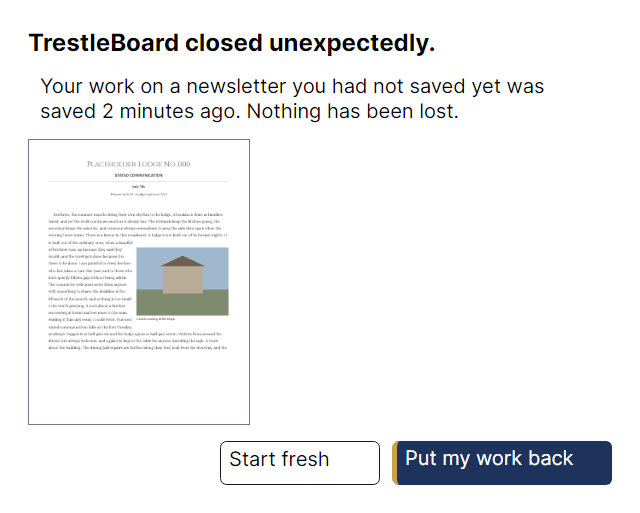
Open TrestleBoard again. It offers the work back, with a picture of the first page so you can see what it is offering, and the time it was last kept. Your work is written to a safe copy every minute, so what is lost is at most the last minute of typing.
I have made a mess of it
Ctrl+Z, as many times as you need. Undo in TrestleBoard reaches things most programs will not let you take back — moving a photograph, replacing a whole list from the address book, changing the typeface of the entire newsletter. If you undo one step too many, Ctrl+Y puts it back.
I want the version from before this evening
Go back to an earlier version… keeps a set of earlier copies of the file you are working on, each with the time it was saved and a picture of its first page.
A brother's name has gone wrong everywhere
Correct it once in the address book, then choose the table on the page and take Update the officers table or Update the birthday list. Both show you every change they would make before making any of them. The address book keeps its own earlier copies too — see the address book.
The writing does not fit
A box that has more words than room says so, and the status line along the bottom explains it in a sentence. Three ways out: make the box taller, make the words shorter, or Carry on in another box — which links the two so the overflow continues where you say, including onto the next page.
Something is greyed out in the menus
It will tell you why. Choose it anyway and the reason appears along the bottom of the window in plain words — this needs a picture; choose one on the page first. Nothing in this program becomes unavailable without being able to say why, and the panel beside your selection never greys anything at all.
A word is underlined that is not misspelled
The spelling check knows ordinary English, not the lodge's vocabulary. Tell it the word is fine and it will remember. It never changes anything on its own.
None of this is my problem
Then it is ours. Open an issue and say what you were doing and what happened, including which system you are on. If the program showed you a message, quote it — the words are chosen carefully and they tell us where to look.
Please do not attach a newsletter with real members' details in it. A screenshot of the part that went wrong, or the example newsletter from Help → Show me an example newsletter, is enough for almost every fault — and neither of them puts anybody's telephone number on a public page.